A real system on our own operations
One of the workflows we run ourselves, shown honestly: the business problem it solves, the actual report it produces, and how the owner uses it. No invented insights, values, or savings.
Internal demonstration using historical records. This runs on The One Group's own operations. It is not a client account, we invent no savings, revenue, or testimonials, and the underlying records are redacted. The same shape of system is what a client implementation looks like — scoped and built into their tools.
The problem
An owner can't see their pipeline at a glance. Deals sit in a spreadsheet, notes, and inboxes, and the ones that go quiet slip through the cracks because nobody can see the whole picture in one place.
What we wanted was simple: one short report, once a week, that told us where every deal stands and what needed attention next. Not a dashboard to check — a summary that lands and gets acted on.
The report it produces
This is the actual weekly report output, produced by the pipeline and read by a person. It groups records by stage and lists the next actions.
OneGroup Weekly Pipeline Report — Oct 05
Pipeline by stage: researching 5 | contacted 2 | follow_up 3
Recommended next actions: 1. Follow up on 8 deals with pending next actions
Stage counts are raw pipeline records — the number of contacts at each stage in our internal list. They are not validated sales opportunities.
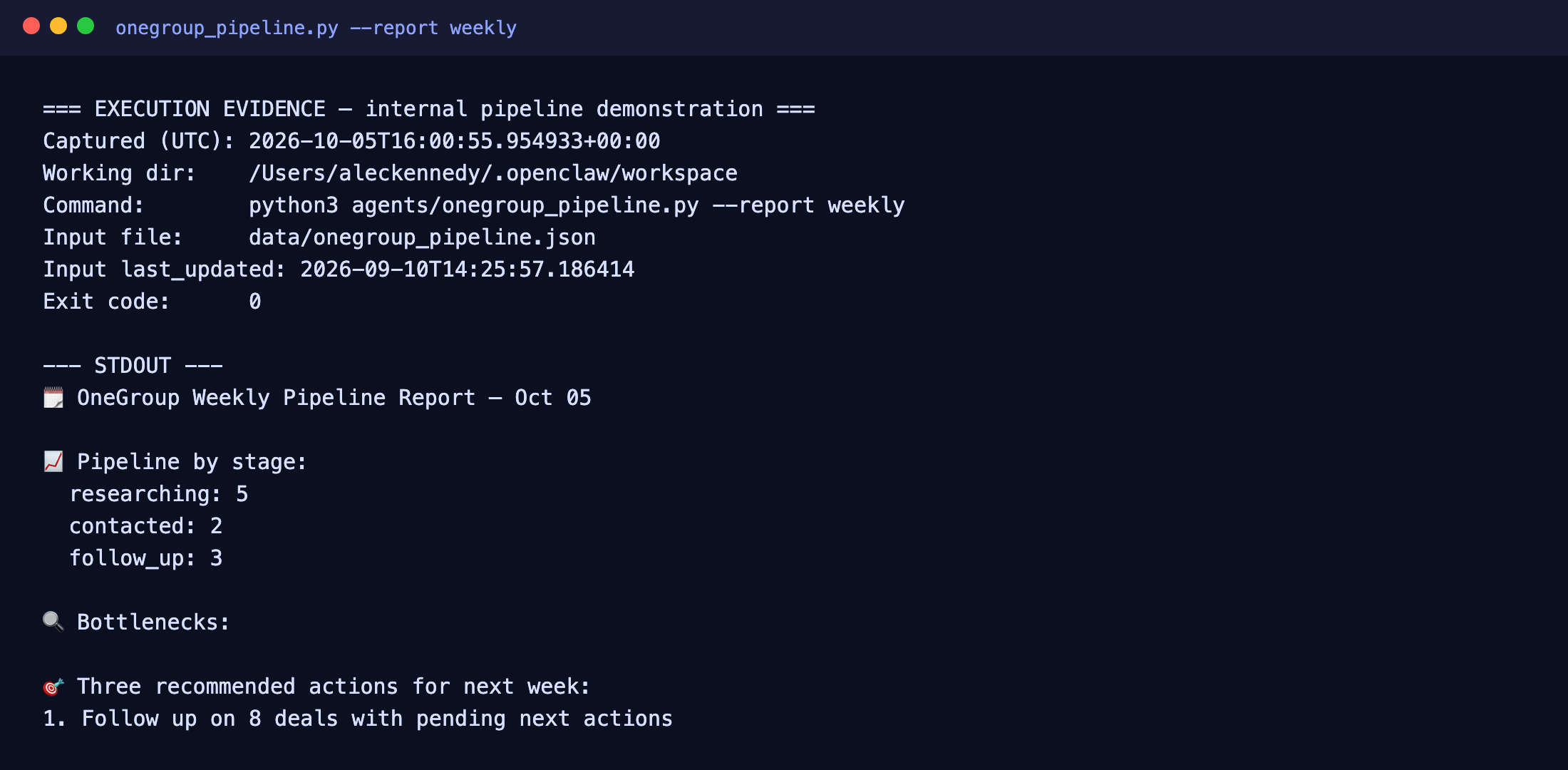
The report was generated by running python3 agents/onegroup_pipeline.py --report weeklyon 2026-10-05, against our internal pipeline file data/onegroup_pipeline.json(records last updated 2026-09-10). It is a historical example output, not a live feed.
How the owner uses it
The system recommends; it doesn't decide. A person reads the report, decides which actions to take, and updates the records. The report's next-actions line is a prompt to act, not an automatic change — nothing is sent, booked, or updated without someone choosing to do it.
This is the same human-in-the-loop pattern we build for clients: the automation does the repetitive gathering, sorting, and drafting, and a person stays in charge of the decisions.
Execution evidence, provenance & limitationsfor the curious — optional reading
Source record (representative, redacted)
Each record is a structured entry our operations write as contacts are researched, scored, and worked. This is one representative record with company identifiers redacted:
{
  "id": "og_...",
  "company": "[redacted]",
  "industry": "HVAC",
  "city": "Boca Raton",
  "source": "arlo_real_tavily",
  "stage": "follow_up",
  "score": 7,
  "priority": "high",
  "owner": "Alec",
  "next_action": "Follow up if no reply in 3 days",
  "next_action_date": "2026-09-13",
  "contacted": true,
  "last_contact": "2026-09-10T14:25:57"
}
How the report was generated
The pipeline is a scheduled script that reads those records and produces the weekly report:
$ python3 agents/onegroup_pipeline.py --report weekly
→ OneGroup Weekly Pipeline Report — Oct 05
What's real, and what isn't
- Runs on The One Group's own operations — internal, not a client account.
- Source records and pipeline command are our own operational records and script.
- The weekly report shown is historical example output, run 2026-10-05.
- Input records are internal operational data, redacted.
- Human review is real — a person decides each week.
- Pipeline stage counts are raw records, not validated opportunities, savings, or revenue.
Limitations
- Internal operations only — a client build is scoped on your tools and your data.
- One workflow, plainly described: records to a weekly report. Not a claim of every possible integration.
- Numbers are counts, not outcomes. No savings, revenue, or recovered cash is claimed.
- Not compliance-certified: no certification (for example HIPAA, SOC 2, or FINRA) is claimed.
Want this shape of system scoped to your business?
Book an AI fit call